
Automation
API
The BeigeCRM API lets your own code do what the app does — create leads from a system we don't integrate with yet, sync deals into a warehouse, keep a customer list in step with another tool.
Five resources are available: leads, deals, people, companies, and forms, each with list, get, create, update, and delete.
The full reference, with a request playground and copy-paste examples in Shell, Ruby, Node.js, PHP and Python, lives at api.beigecrm.com/v2/api/docs. This page is the orientation; that is the specification.
Getting a key#
Go to Settings → API Keys and choose Create key. Give it a name you'll recognise in six months, tick the permissions it needs, and copy the key.
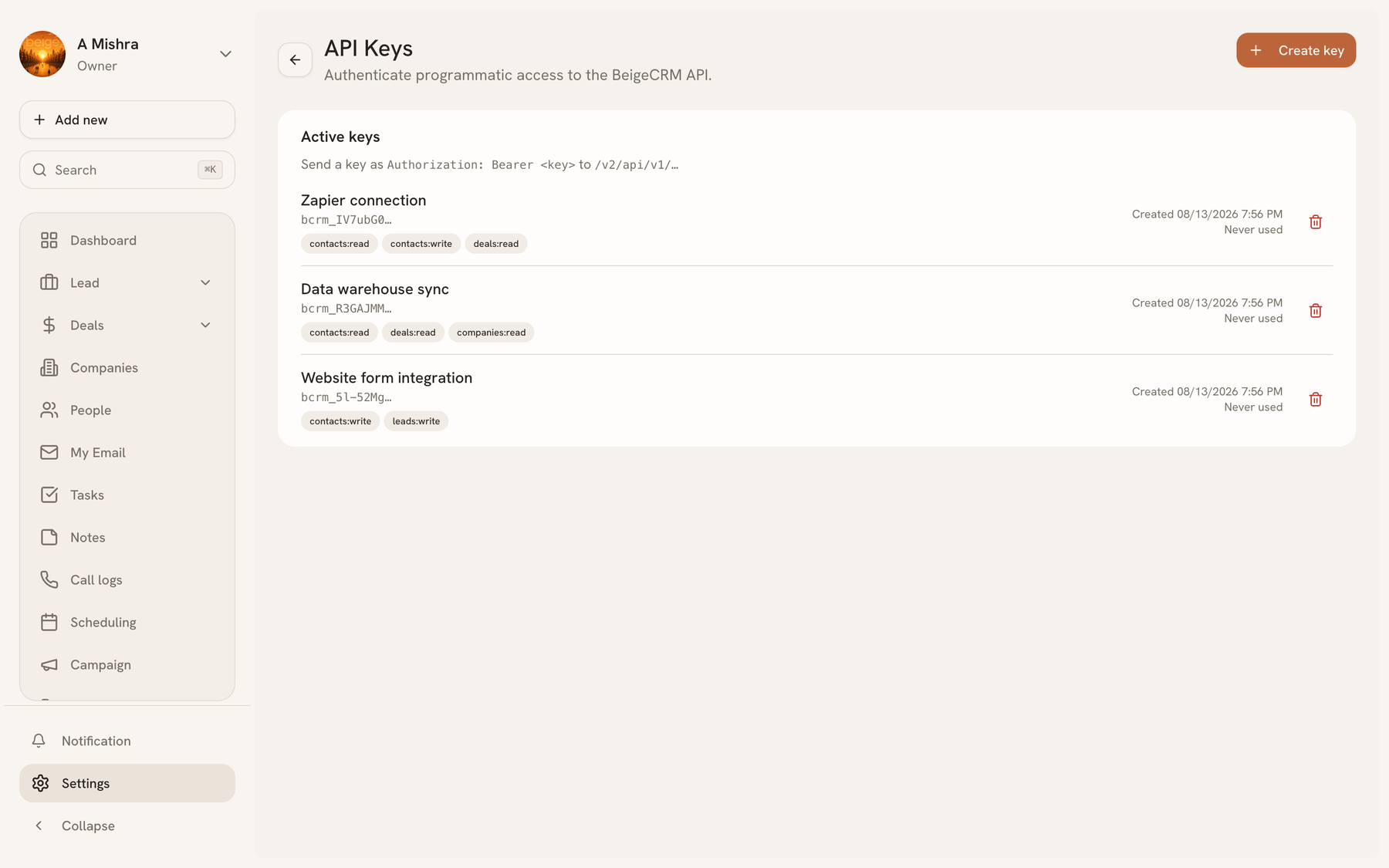
The key is shown once. We store only a hash of it, so there is no screen anywhere that can show it to you again — if you lose it, revoke it and create another.
Making a request#
Send the key as a bearer token. There is no organization in the URL: the key already belongs to one workspace, and only ever reaches that workspace.
curl https://api.beigecrm.com/v2/api/v1/leads \
  -H "Authorization: Bearer bcrm_your_key_here"
Creating a record is the same shape:
curl -X POST https://api.beigecrm.com/v2/api/v1/leads \
  -H "Authorization: Bearer bcrm_your_key_here" \
  -H "Content-Type: application/json" \
  -d '{"email":"[email protected]","firstName":"Harriet","lastName":"Vance","source":"referral"}'
Permissions#
Keys carry per-resource scopes — leads:read, deals:write, and so on. Write includes
read for the same resource, so a key that creates deals can also list them.
Scopes are fixed when the key is created. To widen access, create a new key and revoke the old one; there is no way to escalate an existing key, which means a leaked key's reach can never grow.
A request without the right scope comes back as 403 SCOPE_MISSING, naming the scope
it needed.
Lists and pagination#
List endpoints take page and pageSize (maximum 100) and always return the same
envelope:
{
  "data": [ ... ],
  "pagination": { "page": 1, "pageSize": 25, "total": 132, "hasMore": true }
}
Page until hasMore is false. You can also pass search, and sort with
sortBy (createdAt or updatedAt) and sortOrder.
Rate limits#
Limits are counted per key, so one busy integration can't starve another. Every response tells you where you stand:
| Header | Meaning |
|---|---|
X-RateLimit-Limit | Requests allowed in the current window |
X-RateLimit-Remaining | Requests left |
X-RateLimit-Reset | Seconds until the window resets |
Going over returns 429 with a Retry-After header. Read the headers rather than
guessing — a client that backs off on Retry-After will never be blocked twice.
Errors#
Every error has the same shape, so one handler covers all of them:
{
  "code": "VALIDATION_ERROR",
  "message": "Validation failed",
  "errors": [{ "field": "email", "message": "Invalid email" }],
  "requestId": "req_abc123"
}
| Code | Meaning |
|---|---|
MISSING_API_KEY / INVALID_API_KEY | The key is absent, wrong, or revoked (401) |
API_NOT_IN_PLAN | The workspace's plan doesn't include API access (403) |
SCOPE_MISSING | The key lacks the scope this endpoint needs (403) |
VALIDATION_ERROR | The body failed validation; errors names the fields (400) |
RATE_LIMIT_EXCEEDED | Too many requests (429) |
*_NOT_FOUND | No such record in your workspace (404) |
Quote requestId when you contact support — it identifies the exact request in our logs.
Plans#
API access is a plan feature. On a plan without it, every request returns
403 API_NOT_IN_PLAN. See Team and settings, or check the
pricing page for which plans include it.
Last updated 2026-08-14